
What Is a Pixel? Size, Resolution and Density Explained
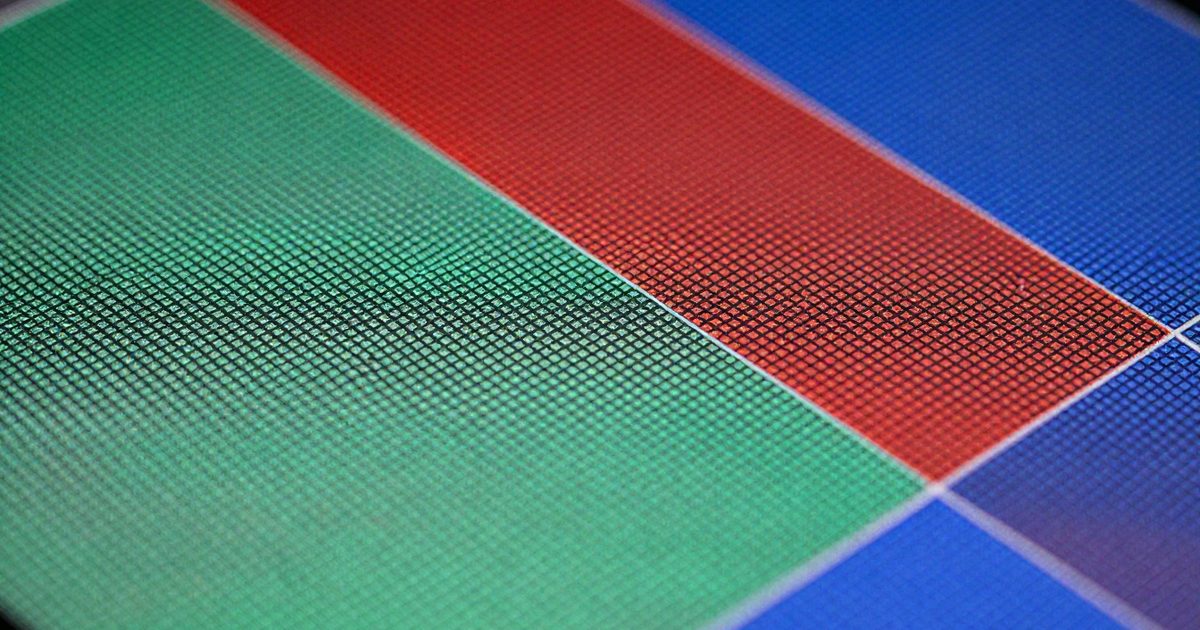
What is a pixel?
A pixel (short for picture element) is the smallest addressable element of a raster image. On a display, it’s the smallest element whose output the screen can control independently (Wikipedia: Pixel). Every photo, screenshot and web graphic is a grid of pixels, and each pixel stores one color.
A grid is described by 2 numbers, width and height. A 1920 x 1080 image has 1,920 columns and 1,080 rows, which makes 2,073,600 pixels. Each pixel has a position and a color, and nothing else. That’s why a pixel doesn’t have a physical size until a screen or a sheet of paper maps it to one.
Here’s what you’ll see when you zoom in. At 800% in an image editor, a photo breaks into visible squares, and each square holds a single color. You can’t split a pixel into smaller parts inside the file, and you can’t add detail by drawing the squares smaller.
The FeetToPixels calculators handle that mapping. They don’t ask you to remember formulas: you enter a size in inches, feet, centimetres or millimetres, and they return pixels, or the reverse.
How big is a pixel?
A pixel has no fixed physical size. Its size equals 1 divided by the pixels per inch (PPI) of the surface that shows it. At 96 PPI a pixel measures 1/96 inch (0.265 mm), and at 300 PPI it measures 1/300 inch (0.085 mm). That’s a 3.125 times difference in width for the same pixel, and there’s no single answer to “how big” because the size comes from the surface, not the pixel.
The web fixes one value. The CSS specification sets 1 in = 2.54 cm = 96 px, so a CSS pixel is 1/96 inch (W3C: CSS Values and Units). The spec ties that unit to a reference viewing angle at arm’s length, and it works out to about 0.26 mm. On a high-density screen, one CSS pixel can correspond to several physical device pixels (Wikipedia: Pixel), so a page doesn’t shrink when you move to a sharper screen.
Here are 5 common densities and the pixel size each one gives:
| PPI | Pixel size (inches) | Pixel size (mm) | Where you’ll meet it |
|---|---|---|---|
| 72 | 0.0139 | 0.353 | Classic Mac screen default |
| 96 | 0.0104 | 0.265 | CSS and Windows default |
| 108.8 | 0.0092 | 0.233 | 27 in 1440p monitor |
| 163.2 | 0.0061 | 0.156 | 27 in 4K monitor |
| 300 | 0.0033 | 0.085 | Print files |
The 72 and 96 PPI defaults date to the 1980s, when Apple’s Macs assumed 72 PPI and Windows assumed 96 PPI (Wikipedia: Dots per inch). The monitor rows come from the formula PPI = diagonal in pixels / diagonal in inches. Our PPI calculator runs it for any screen, so you don’t need to work out the square root by hand.
Pixels vs megapixels
A megapixel (MP) is one million pixels. You multiply width by height, then divide by 1,000,000 (Wikipedia: Pixel). A 4000 x 3000 photo holds 12,000,000 pixels, so it’s a 12 MP photo.
Here’s the same math for 3 familiar sizes:
- 1920 x 1080 (Full HD) holds 2,073,600 pixels, which is 2.07 MP.
- 3840 x 2160 (4K UHD) holds 8,294,400 pixels, which is 8.29 MP.
- 4000 x 3000 (a typical 12 MP photo) holds 12,000,000 pixels, which is 12 MP.
Pixels count the total, and megapixels shrink that total into a number you can compare. A 12 MP photo holds 1.45 times the pixels of a 4K screen (12,000,000 / 8,294,400), so you can’t see every pixel of it at once on that screen.
A pixel count tells you how much data an image holds. It doesn’t tell you how sharp the image looks, because lens, sensor and compression change that (Wikipedia: Pixel). Don’t treat MP as a quality score: it counts pixels, and it isn’t a measure of sharpness. The megapixel calculator converts between pixel dimensions and MP in either direction.
Screen pixels vs image pixels vs printed dots
There are 3 different things people call a pixel: image pixels, screen pixels and printed dots. They share a grid, yet each one lives in a different place and follows different rules.
- Image pixels are numbers stored in a file. A JPEG, PNG or screenshot is a list of color values arranged in rows and columns.
- Screen pixels are physical elements on a display. In LCD, LED and plasma screens, each pixel splits into single-color regions called subpixels, mostly red, green and blue (Wikipedia: Pixel). LCDs typically divide each pixel vertically into 3 subpixels.
- Printed dots are the ink or toner marks a printer makes. Laser printers range from 600 to 2,400 dots per inch (DPI) (Wikipedia: Dots per inch).
One image pixel usually needs many printer dots. A 300 PPI file on a 1,200 DPI printer gets a 4 x 4 grid of dots per pixel (1,200 / 300 = 4), which is 16 dots. On a 2,400 DPI printer the grid grows to 8 x 8, which is 64 dots.
A screen shows image pixels 1 to 1 when the file’s pixel dimensions match the screen’s. When they don’t match, the screen scales the picture, and that scaling is where blur comes from. A 1920 x 1080 image on a 3840 x 2160 screen needs exactly 2 screen pixels in each direction per image pixel, so it scales without fractions.
How do pixels turn into physical size?
Physical size in inches equals pixels divided by pixels per inch (PPI). To get centimetres multiply inches by 2.54, and to get feet divide inches by 12.
Take a 4000-pixel-wide photo. At 300 PPI it prints 13.33 in wide (33.87 cm, 338.7 mm, 1.11 ft). At 72 PPI the same pixels stretch to 55.56 in (141.1 cm). The pixel count didn’t change. Only the density did.
Adobe shows the same effect. A 1000 x 1000 pixel image prints at about 13.9 x 13.9 inches at 72 ppi, but only 3.3 x 3.3 inches at 300 ppi (Adobe: Image size and resolution). Here’s a 1,920-pixel width at 4 densities:
| PPI | Width in inches | Width in cm | Width in mm |
|---|---|---|---|
| 72 | 26.67 | 67.73 | 677.3 |
| 96 | 20.00 | 50.80 | 508.0 |
| 150 | 12.80 | 32.51 | 325.1 |
| 300 | 6.40 | 16.26 | 162.6 |
On a screen, CSS fixes the rule: 96 pixels make 1 inch, so 960 pixels make 10 inches. Print has no such fixed rule. You choose the PPI, and the size follows.
You’ll often need the reverse: pixels needed = inches x PPI. A 10 in wide print at 300 PPI needs 3,000 pixels (10 x 300), and at 150 PPI it needs 1,500. That’s why the converters below ask for the PPI first.
Our pixels to inches converter applies any PPI you pick. The DPI calculator shows what size a given pixel count reaches at 300 DPI, which is the usual target for close-up prints.
Frequently asked questions
Is a pixel a unit of length?
No, a pixel is a unit of count, not a fixed length. CSS is the exception: it defines 1 px as 1/96 inch (about 0.265 mm), so a CSS pixel behaves as a length unit on the web.
How many pixels are in an inch?
It depends on the pixels per inch (PPI) of the surface. A CSS inch holds 96 pixels, a classic Mac screen used 72, and a print file usually holds 300 pixels in each printed inch.
What is a subpixel?
A subpixel is one single-color region inside a display pixel, usually red, green or blue. LCDs typically divide each pixel vertically into 3 subpixels, and the screen mixes their brightness to produce each pixel's color.
What is a CSS pixel?
A CSS pixel is the web's reference unit, set at 1/96 of a CSS inch. On a high-density screen, one CSS pixel can span several physical device pixels, so text keeps the same apparent size.
Do more pixels always mean a sharper image?
No, a higher pixel count doesn't guarantee sharpness. Lens quality, sensor size, focus and compression all change the result, and a 12 MP photo can look softer than an 8 MP one.