DPI vs PPI: The Real Difference for Print and Screens
What is the difference between DPI and PPI?
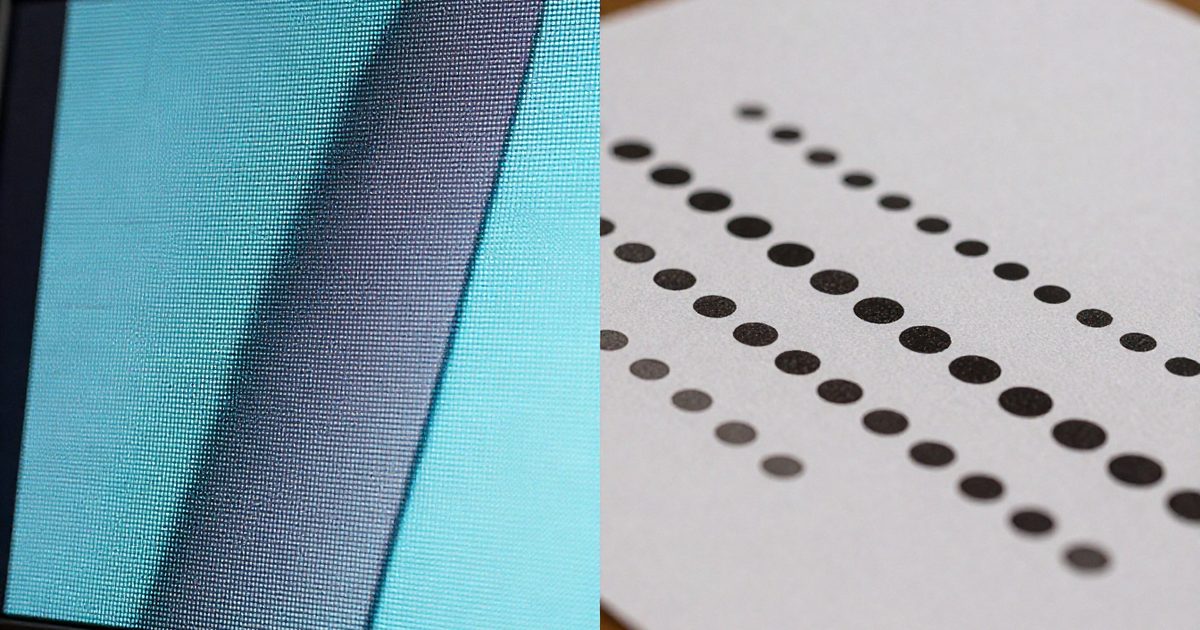
PPI (pixels per inch) measures the pixel density of an image or screen, and DPI (dots per inch) measures the dot density a printer lays on paper. Wikipedia puts it this way: DPI is the output resolution of a printer, and PPI is the input resolution of a photograph or image (Wikipedia: Dots per inch).
| PPI | DPI | |
|---|---|---|
| Full name | Pixels per inch | Dots per inch |
| Counts | Pixels in an image or on a screen | Ink or toner dots from a printer |
| Belongs to | Image files and displays | Printers |
| Typical values | 72, 96, 300 | 600 to 2,400 on laser printers |
| Formula | pixels / inches | dots / inches |
There’s one more difference. PPI changes when you resize a file, and a printer’s DPI doesn’t change with it, because it’s a property of the hardware.
Don’t read them as rival standards. They’re 2 stages of one job: the file holds pixels per inch, and the printer turns each pixel into dots. In one line, PPI lives in the file and DPI lives in the printer.
The 2 numbers connect at the printer. Dots per pixel along one side equals DPI divided by PPI. A 300 PPI file on a 1,200 DPI printer uses 4 dots per side (1,200 / 300 = 4), so each pixel becomes a 4 x 4 grid of 16 dots. Here’s an example. A 3000-pixel-wide image set to 300 PPI is 10 in wide, and it’s the same 10 in image whether the printer runs at 600 or 2,400 DPI. The FeetToPixels homepage collects the calculators for both numbers.
When does PPI matter?
PPI matters whenever pixels meet a physical size: on a screen, in an image file and in a print layout. There are 3 places you’ll use it.
- Screens. PPI = diagonal in pixels / diagonal in inches. A 24 in Full HD monitor has 91.8 PPI, a 27 in 1440p monitor has 108.8 PPI and a 32 in 4K monitor has 137.7 PPI. The PPI calculator runs this for any screen.
- Image files. Print width in inches = pixels / PPI. A 3000-pixel-wide photo at 300 PPI measures 10 in (25.4 cm), and at 150 PPI it measures 20 in (50.8 cm).
- Print layouts. Designers set a PPI target before they build a file, then size the canvas to match. The inches to pixels converter returns the canvas size for any print size.
Don’t confuse a file’s PPI tag with a screen’s PPI. The tag doesn’t change how big the file looks in a browser, and it won’t change the monitor’s own PPI. Phones show how widely screen PPI varies. Wikipedia cites 807 PPI for the 4K display on the 2017 Sony Xperia XZ Premium (Wikipedia: Pixel density), against 91.8 PPI for the 24 in Full HD monitor above.
On screens PPI is a property of the display. A 1000 x 1000 pixel image looks identical on screen whether its resolution is set to 72 ppi or 300 ppi, because the screen shows the pixel dimensions (Adobe: Image size and resolution).
When does DPI matter?
DPI matters at the printer, where it decides how finely dots build each pixel. Laser printers run from 600 to 2,400 DPI, and high-end models reach 1,200 to 1,440 and 2,400 to 2,880 DPI (Wikipedia: Dots per inch).
Printer DPI runs higher than image PPI by design. Wikipedia’s example is a 100 x 100 pixel image printed at 1 inch, which needs a printer capable of 400 to 600 DPI (same source). Here’s how many dots one pixel gets from a 300 PPI file:
| Printer DPI | Dots per side | Dots per pixel |
|---|---|---|
| 600 | 2 | 4 |
| 1,200 | 4 | 16 |
| 2,400 | 8 | 64 |
More dots per pixel doesn’t add image detail, because the file holds the same pixels. A blurry 600-pixel photo stays blurry on a 2,400 DPI printer.
You don’t need to match the printer’s DPI to the file’s PPI. A 300 PPI file prints correctly on a 600, 1,200 or 2,400 DPI printer, and it isn’t “upgraded” by the higher number. Check your printer’s rated DPI in its specification sheet. Then use the DPI calculator to see what your file delivers at the print size you want.
Why do people mix them up?
People mix up DPI and PPI because print shops, software and file settings share one label: resolution. There are 3 causes, and none of them is a quality problem. It’s a naming problem.
- Print shop language. Shops ask for “300 dpi” files, and the number describes the image file, not their printer. That’s a PPI request, even though the word is dpi. Instantprint tells designers to “always save artwork at 300 dpi” (Instantprint: Resolution guide).
- Software labels. Image editors show a single Resolution field, and the unit is pixels per inch (Adobe: Image size and resolution).
- Screen history. Apple’s Macs defaulted to 72 PPI because 72 points per inch matched the 72 pixels per inch on their screens, and Windows assumed 96 PPI (Wikipedia: Dots per inch). Both numbers still appear in file settings today.
A file labelled 300 DPI and a file set to 300 PPI request the same print density, so the confusion is about which value to change. The next section sorts that out.
Which number do you type into Photoshop?
Type your target PPI into the Resolution box of the Image Size dialog (Image > Image Size). The field is measured in pixels per inch, so you’re entering PPI, even if your print shop calls it DPI. It isn’t a printer setting, and it doesn’t need the printer’s DPI. When a shop asks for “a 300 dpi file”, it’s asking for 300 PPI at final print size, because a file can only hold pixels.
Adobe suggests about 300 ppi for professional print and 72 to 96 ppi for images that stay on a screen (Adobe: Image size and resolution). Follow this order:
- Open Image > Image Size.
- Uncheck Resample. Photoshop then changes only resolution and print size, and the pixel count stays fixed. Don’t tick it unless you want Photoshop to add or remove pixels.
- Type 300 into Resolution for a close-up print, or 150 for a large poster.
- Read the new width and height in the dialog.
A 2400 x 3000 pixel file gives 8 x 10 in at 300 PPI and 16 x 20 in at 150 PPI. If the file’s too small for the print size you need, you’ve got 2 choices: print smaller, or find a larger original. To see where the limit sits, work out the pixels first with the inches to pixels converter, then compare them with your file. Here’s the short version: type PPI into the editor, and read DPI off the printer’s spec sheet.
Frequently asked questions
Is 300 DPI the same as 300 PPI?
No, they measure different things, although print files set both to 300. 300 PPI means 300 image pixels per printed inch, and 300 DPI means a printer lays 300 dots in each inch of paper.
Do monitors have DPI?
No, monitors have PPI because they show pixels, not printed dots. A 24 in Full HD monitor has 91.8 PPI. Software still assumes a nominal density, and Windows treats screens as 96 PPI.
Does PPI affect web images?
No, browsers draw a web image from its pixel dimensions, so a 1200-pixel-wide image fills 1200 CSS pixels whether its PPI tag says 72 or 300. Adobe confirms the setting doesn't change on-screen size.
Does a 600 DPI printer need a 600 PPI file?
No, a 300 PPI file prints well on a 600 DPI printer. The printer builds each image pixel from a 2 x 2 grid of dots (600 / 300 = 2), which is 4 dots per pixel.
Is PPI higher on a phone than on a monitor?
Yes, phone screens pack more pixels into each inch. Wikipedia cites 807 PPI for the 4K display on the 2017 Sony Xperia XZ Premium, against 91.8 PPI for a 24 in Full HD monitor.